

了解robots
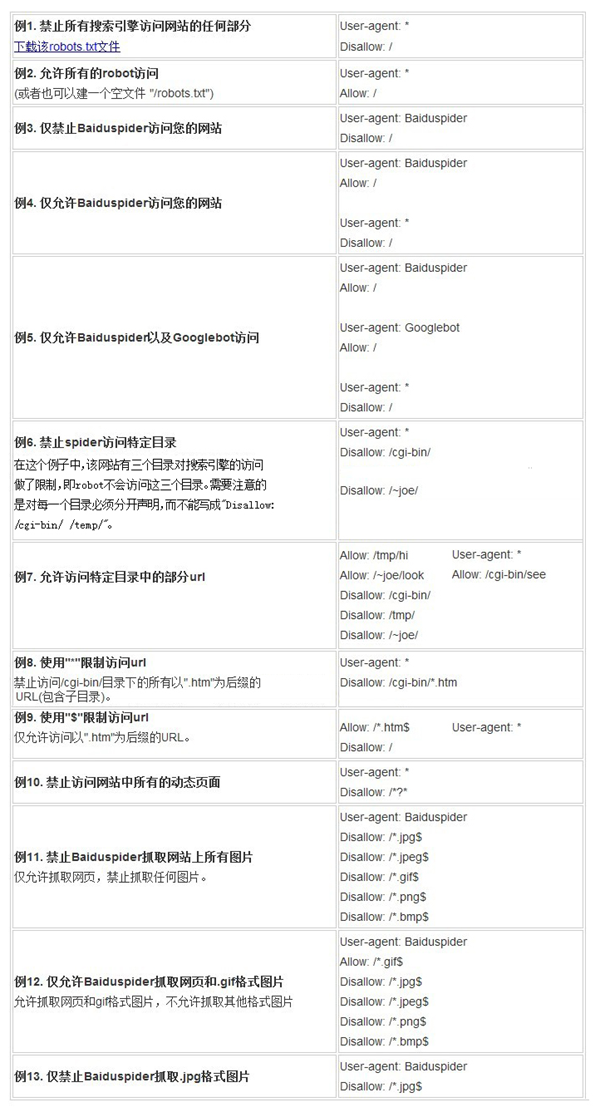
WordPress中的robots
如果您目的是
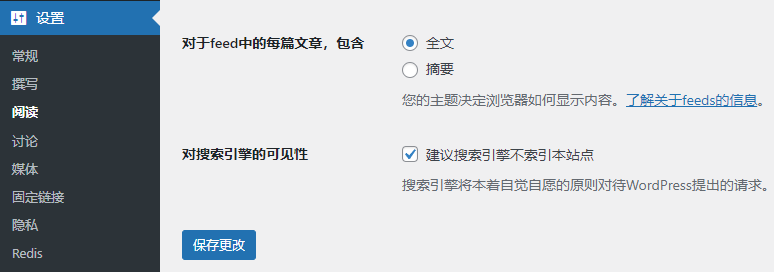
搜索引擎在访问网站时,会先查看网站根目录下是否存在robots.txt文件,robots文件用来指定搜索引擎禁止抓取或允许抓取某些内容。wp-includesfunctions.php
/**
 * Displays the default robots.txt file content.
 *
 * @since 2.1.0
 * @since 5.3.0 Remove the "Disallow: /" output if search engine visiblity is
 *              discouraged in favor of robots meta HTML tag via wp_robots_no_robots()
 *              filter callback.
 */
function do_robots() {
 header( 'Content-Type: text/plain; charset=utf-8' );

 /**
  * Fires when displaying the robots.txt file.
  *
  * @since 2.1.0
  */
 do_action( 'do_robotstxt' );

 $output = "User-agent: *\n";
 $public = get_option( 'blog_public' );

 $site_url = parse_url( site_url() );
 $path     = ( ! empty( $site_url['path'] ) ) ? $site_url['path'] : '';
 $output  .= "Disallow: $path/wp-admin/\n";
 $output  .= "Allow: $path/wp-admin/admin-ajax.php\n";

 /**
  * Filters the robots.txt output.
  *
  * @since 3.0.0
  *
  * @param string $output The robots.txt output.
  * @param bool   $public Whether the site is considered "public".
  */
 echo apply_filters( 'robots_txt', $output, $public );
}
你可以使用wordpress默认的robots文件设置,针对自己网站的情况做相应的更改;也可以自己写一个robots.txt,放在网站根目录下,那么
关于怎么设置
© 版权声明
部分内容源于网络
THE END


请登录后查看评论内容